Last updated: October 30, 2026
You just received an email saying your personal information may have been exposed in a data breach.
Now what?
Should you immediately change all your passwords? Is your bank account at risk? Could someone steal your identity?
The right response depends on exactly what information was exposed.
A leaked email address is not the same as a stolen password, and neither is the same as having your government identification number exposed.
Fortunately, there are practical steps you can take to reduce your risk.
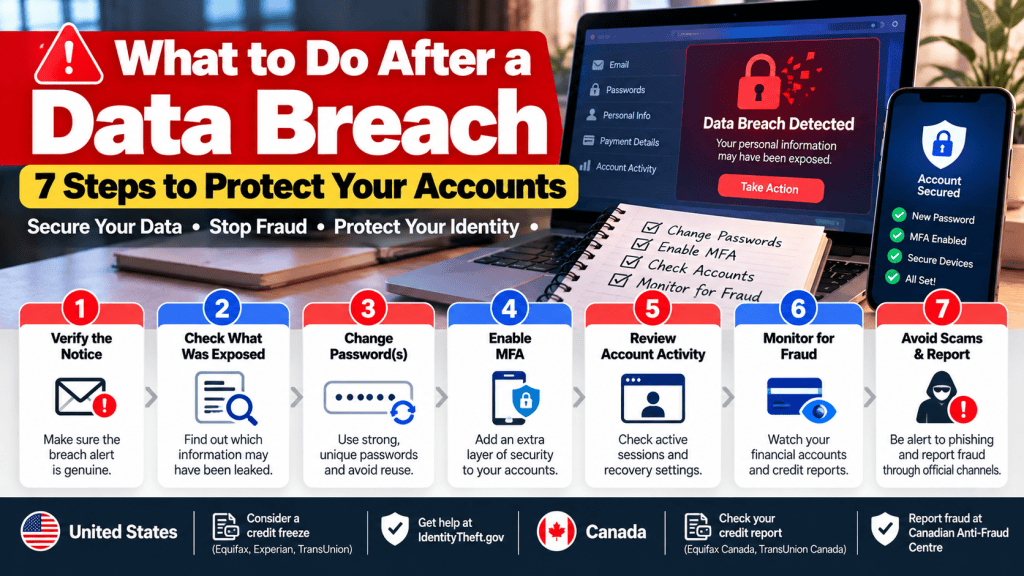
This guide covers seven actions recommended by government cybersecurity and consumer protection agencies in the United States and Canada.
Quick Answer: What Should You Do After a Data Breach?
If you’ve received a data breach notification, start with these seven steps:
- Verify that the breach notification is genuine.
- Find out what information may have been exposed.
- Change compromised or reused passwords.
- Enable multifactor authentication.
- Check active sessions and account recovery settings.
- Monitor for suspicious financial and account activity.
- Watch for phishing attempts and report fraud when appropriate.
You don’t necessarily need to take every action for every breach.
Use the type of exposed information to decide what to prioritize.
Step 1: Verify the Data Breach Notification
Before clicking any links in an email or text message, confirm that the notification is legitimate.
Scammers sometimes impersonate companies during widely reported data breaches.
A fraudulent message might claim that your account has been compromised and urge you to reset your password immediately.
The link could lead to a fake website designed to steal your login credentials.
How to Check Whether a Breach Notice Is Real
Start by visiting the company’s official website or mobile app directly.
Look for a security notice, an account notification, or an announcement from the company.
You can also contact customer support through a phone number or contact form you independently locate.
Avoid relying on the contact information contained in a suspicious message.
Red Flags to Watch For
Be cautious if the notification:
- Requests your password or authentication code
- Demands immediate payment
- Contains an unfamiliar website address
- Asks you to install unexpected software
- Threatens urgent consequences unless you follow a link
- Claims to offer account recovery through an unofficial website
A real breach can become the subject of fake follow-up messages.
Never enter your existing password into a website you reached through an unverified security alert.
Step 2: Find Out What Information Was Exposed
Not every data breach involves the same information.
A company’s notice may identify whether the incident affected email addresses, passwords, names, payment details, or government identification numbers.
Read that section carefully.
What Was Exposed, and What Should You Do?
| Information Exposed | Recommended First Action |
|---|---|
| Email address only | Watch for phishing and suspicious login activity |
| Password or login credentials | Change the affected password and any reused passwords |
| Email account access | Secure email, recovery settings, and connected accounts |
| Credit or debit card details | Contact your card issuer and review transactions |
| Bank account information | Contact your financial institution for guidance |
| Social Security Number (US) | Review identity protection options, including credit freezes |
| Social Insurance Number (Canada) | Monitor credit reports and follow Service Canada guidance |
| Name, address, or phone number | Be alert to impersonation and targeted scams |
The actual response depends on the precise information exposed and whether unauthorized activity has occurred.
For example, if an online store reports that email addresses were exposed but passwords were not, changing every password you own may not be necessary.
However, if your login credentials may have been compromised, password changes become much more important.
What If the Company Doesn’t Know What Was Stolen?
Sometimes an organization announces an investigation before it knows the full scope of an incident.
In that situation, follow its official updates.
You can take reasonable preventive steps while avoiding assumptions about what attackers obtained.
A suspected breach does not automatically mean someone has accessed your individual account.
Step 3: Change Compromised and Reused Passwords
If your password was exposed or someone accessed your account without permission, change that password as soon as you can do so safely.
Use the official website or application rather than a link from an unexpected message.
Choose a strong, unique password that you have never used on another account.
Why Password Reuse Is Dangerous
Imagine using the same password for an online shopping account and your primary email.
If attackers obtain the shopping account credentials, they may try those credentials on other websites.
This technique is known as credential stuffing.
Even a breach at a relatively unimportant website could therefore put more valuable accounts at risk.
The Canadian Centre for Cyber Security specifically recommends changing passwords on other accounts if they share a password known to be compromised.
Should You Change Every Password?
Not necessarily.
Focus first on accounts where credentials may have been compromised and other accounts using the same or similar passwords.
Prioritize:
- Your primary email account
- Financial accounts
- Accounts containing sensitive personal information
- Shopping accounts with saved payment details
- Other accounts sharing the affected password
Use a reputable password manager to generate and store unique credentials.
This reduces the temptation to reuse the same password across services.
What If You Can’t Log In?
If someone has changed your password, use the account provider’s official recovery process.
Check whether the provider offers a specific compromised-account recovery page.
Avoid unofficial services that claim they can retrieve your account in exchange for payment.
Step 4: Enable Multifactor Authentication
Multifactor authentication, or MFA, requires another form of verification in addition to your password or another primary authentication method.
Depending on the service, this could involve:
- A passkey
- A hardware security key
- An authenticator app
- A one-time verification code
- A device-based approval
Enabling MFA can make it harder for someone to access your account even if they know your password.
Which MFA Method Should You Use?
Where supported, phishing-resistant options such as FIDO2 security keys and appropriately implemented passkeys are particularly valuable.
Authenticator applications can also provide additional protection.
SMS verification is generally preferable to having no additional authentication, but it has limitations.
Choose the strongest method supported by the service that you can use reliably.
Don’t Approve Unexpected Login Requests
If your phone suddenly asks you to approve a login you didn’t initiate, deny it.
Attackers sometimes repeatedly send authentication prompts hoping that someone eventually approves one.
Also, never share a one-time authentication code with someone claiming to be customer support.
The Canadian Centre for Cyber Security notes that MFA is an important security layer but is not immune to phishing and session theft.
Step 5: Review Active Sessions and Account Recovery Settings
Changing your password is important, but it may not address every form of unauthorized access.
Depending on the service, an attacker might already have an active session or have modified your account recovery settings.
Check Your Active Devices
Many services provide a page showing recent sign-ins or devices currently connected to your account.
Look for:
- Devices you don’t recognize
- Unexpected locations
- Login activity at unusual times
- Changes you did not make
If the service offers an option to sign out other sessions, consider using it after securing your credentials.
Not every service uses the same session-management system, so follow its official recovery instructions.
Review Account Recovery Information
Check whether your recovery email address and phone number are correct.
Remove unfamiliar recovery methods.
If available, inspect connected applications and third-party account permissions.
Disconnect anything you don’t recognize.
Pay Special Attention to Your Email
Your primary email is one of your most important accounts.
Password-reset messages for other services often arrive there.
Review your email account’s security activity and, where supported, check for unfamiliar forwarding rules or delegated access.
A compromised inbox can expose several other accounts even if those accounts use different passwords.
Step 6: Monitor for Suspicious Activity
Once you’ve secured affected credentials, monitor for signs that someone is misusing your information.
The specific steps depend on what was exposed.
If Payment Card Information Was Exposed
Contact your bank or card issuer through its official website, app, or the number on your card.
Ask whether the card needs to be locked or replaced.
Review recent transactions for anything you don’t recognize.
Report suspicious transactions promptly.
You do not need to wait until a fraudulent purchase appears before asking your financial institution what protections are appropriate.
If Your Identity Information Was Exposed
Check whether someone has opened accounts or submitted credit applications using your identity.
The procedures differ between the United States and Canada.
United States
The Federal Trade Commission recommends reviewing your credit information and considering a credit freeze or fraud alert when appropriate.
A U.S. credit freeze is free to place and lift, and generally requires contacting all three major credit bureaus:
- Equifax
- Experian
- TransUnion
A credit freeze makes it harder for someone to open new credit in your name, but it does not prevent every type of fraud.
For individualized guidance based on the information exposed, visit IdentityTheft.gov.
Canada
The Financial Consumer Agency of Canada recommends checking credit reports for unfamiliar accounts or inquiries.
Canada’s two major credit bureaus are Equifax Canada and TransUnion Canada.
If you suspect identity theft, you can ask about placing fraud alerts.
Depending on your province or territory, a security freeze may also be available.
Unlike the United States, Canadian credit-freeze availability is not uniform across the country.
Check the applicable provincial rules and credit bureau procedures before assuming you can place a freeze.
If your Social Insurance Number has been exposed, review Service Canada’s official SIN fraud and data breach guidance.
Keep Monitoring After the Initial Notification
Suspicious activity might not appear immediately.
Continue checking account notifications, financial statements, and credit information as appropriate.
If you discover fraudulent activity, report it using the official channels for your country.
Step 7: Watch for Phishing and Report Fraud
After a major data breach becomes public, scammers may attempt to take advantage of the attention.
For example, you might receive a message claiming:
“Your account was exposed. Click here to receive compensation.”
Or:
“Your password expires in ten minutes. Verify your identity now.”
These messages may be designed to steal additional information.
How to Protect Yourself
- Visit official websites directly.
- Avoid unexpected attachments.
- Don’t disclose verification codes.
- Don’t trust caller ID alone.
- Be skeptical of urgent payment requests.
- Check whether a support message comes from an official channel.
If someone claims to be from your bank, end the unexpected interaction and contact the bank independently.
Where to Report Identity Theft or Fraud
United States: Visit IdentityTheft.gov to report identity theft and obtain recovery guidance.
Canada: Report fraud or attempted fraud through the Canadian Anti-Fraud Centre.
If you find unauthorized financial activity, contact your financial institution directly.
For an account provided by your employer, notify your organization’s IT or security team promptly and follow its procedures.
Data Breach vs. Hacked Account: What’s the Difference?
These terms are related but not identical.
A data breach occurs when information is exposed or accessed without authorization.
A hacked account means someone has gained unauthorized access to a particular account.
A large company can experience a data breach without every customer account being individually accessed.
Similarly, your personal account can be compromised through phishing or password reuse even when the service itself hasn’t suffered a broad data breach.
Understanding the difference helps you respond appropriately.
Should You Use a Password Manager After a Data Breach?
For many people, a password manager is one of the easiest ways to improve password security.
It can generate a different password for each website and securely store those credentials.
Some managers also help identify reused or known-compromised passwords.
However, password managers are not a complete security solution.
Protect the manager itself with a strong primary password or passphrase, use MFA where supported, and keep your devices updated.
What About Passkeys?
Passkeys are another option increasingly supported by online services.
They use cryptographic authentication instead of requiring you to remember and type a traditional password.
Properly implemented passkeys can offer strong resistance to phishing.
If your important accounts support passkeys, they are worth considering alongside other security measures.
Printable Data Breach Response Checklist
Use this checklist to keep track of your next steps.
- Confirm the breach notification using the company’s official website.
- Identify what personal information may have been exposed.
- Change any compromised or reused passwords.
- Enable strong MFA on important accounts.
- Check active devices, sessions, and recovery methods.
- Review bank transactions and credit information where relevant.
- Watch for suspicious emails, texts, and calls.
- Report confirmed fraud through official channels.
- Save important notifications and incident records.
- Follow the affected company’s updates.
You can revisit this checklist whenever a service you use announces a security incident.
Frequently Asked Questions
Should I change my password after every data breach?
Not necessarily. It depends on whether your password was exposed, your account was accessed, or the company recommends a reset. Passwords known or suspected to be compromised should be replaced, along with reused passwords.
Can someone hack me with just my email address?
An email address alone does not automatically give someone access to your accounts. However, it can be used for targeted phishing, impersonation, or attempts to match credentials exposed elsewhere.
How do I know if someone has accessed my account?
Check the service’s recent login activity, connected devices, account settings, and security notifications. Unexpected changes may indicate unauthorized access.
Is two-factor authentication enough to stop hackers?
No security control guarantees complete protection. MFA reduces risk, but some methods remain vulnerable to phishing or stolen sessions. Phishing-resistant authentication offers stronger protection where available.
Should I freeze my credit after a data breach?
The answer depends on the information exposed, your location, and your circumstances. In the United States, credit freezes are available for free from all three major bureaus. In Canada, availability depends on provincial or territorial rules.
Does a data breach mean my identity has been stolen?
No. A breach can expose information without resulting in confirmed identity theft. However, exposed information may increase the risk of future misuse.
What if the company offers free credit monitoring?
Check whether the offer is legitimate and what it covers. Credit monitoring can help identify certain suspicious changes, but it does not prevent every form of identity theft.
Should I pay someone to recover my hacked account?
Be cautious about anyone promising guaranteed recovery. Start with the official account provider’s recovery process. Avoid sharing credentials or making payments to unverified recovery services.
Final Thoughts: Respond to the Risk, Not Just the Headline
A data breach notification can be alarming, but the most effective response is to identify what information was exposed and take appropriate action.
If credentials were compromised, secure those accounts immediately.
If financial or identity information was exposed, review the relevant protective measures.
And regardless of the incident, unique passwords, strong authentication, and careful account monitoring can reduce your risk.
You don’t need to panic or change every password indiscriminately. You need to secure the accounts and information that may actually be at risk.
Bookmark this checklist so you have a practical starting point the next time an online service reports a security incident.
Official Sources and References
- FTC — Have You Been Affected by a Data Breach?
- FTC — Credit Freezes and Fraud Alerts
- IdentityTheft.gov — Official US Identity Theft Recovery
- Canadian Centre for Cyber Security — Rethink Your Password Habits
- Canadian Centre for Cyber Security — Secure Your Accounts With MFA
- Financial Consumer Agency of Canada — Protecting Your Financial Information After a Data Breach
- Financial Consumer Agency of Canada — Checking Your Credit Report for Errors and Fraud
- Service Canada — SIN Fraud and Data Breaches
- Canadian Anti-Fraud Centre
Editorial disclaimer: This article provides general account security and consumer awareness information. It is not individualized legal or financial advice. The appropriate response to an incident depends on the information exposed and applicable local procedures. Always verify instructions with the relevant service provider or government agency.

